<aside> 🇫🇷
Vous préférez le français ? Cliquez ici pour accéder à la page d'aide en français
</aside>
New to NewMail? Watch the video for your mailbox: install, first assisted emails, tour of the AI profile.
<aside> 📧
Gmail
</aside>
https://www.tella.tv/video/automate-your-inbox-with-newmail-ai-97or/embed
<aside> 🖥️
Outlook
</aside>
https://www.tella.tv/video/quickstart-in-outlook-01bp/embed
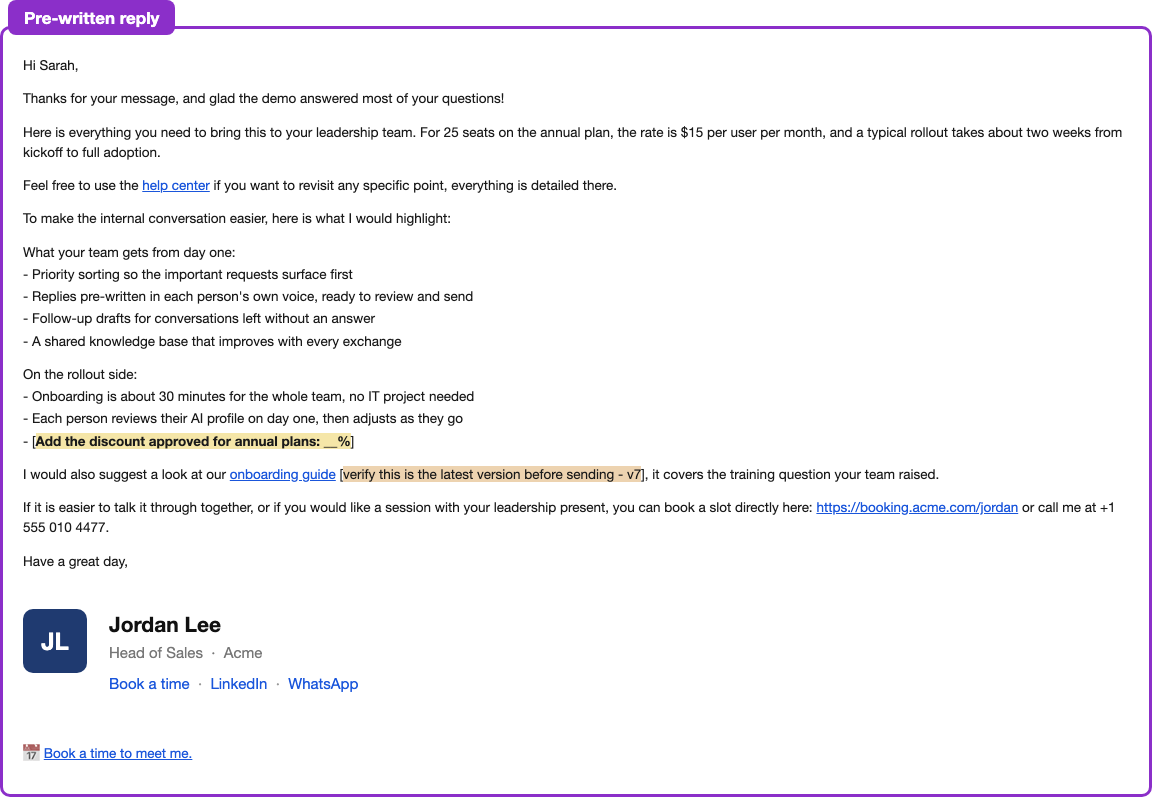
In your style and in about a minute, NewMail writes a complete pre-written reply — from the first word down to the signature.
Pre-written reply
What it contains, to check before sending:
Examples — a field to complete, and a link to verify:

Field to complete manually - like in a template

Linked resource added by the AI
The original email, which the AI read to write the reply, appears below so you can quickly get the full context of the conversation, whether you are in conversation mode or not.